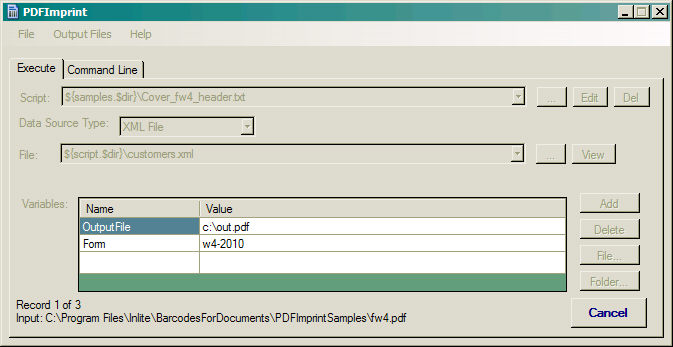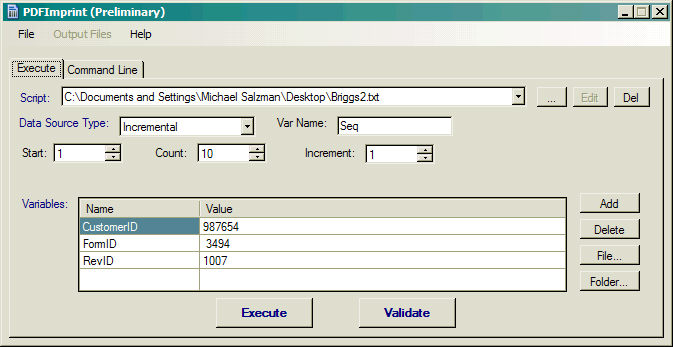
Execute panel configures PDFImprint execution process. Elements on the panel correspond to options on PDFImprint command line.
These field definitions define the runtime values for a single execution, which can be run directly by pressing the Execute button. The resulting command line can also be used separately, and is shown in the Command Line panel.
Script
Specifies the location and the name of the script file (/s parameter). Edit the selected script file in Notepad (or other text editor).
The control maintains a list of the recently referenced script files.
Data Source Type
Defines the data source specification (/d parameter). Selects the type and sets the type-specific parameters of the data sources.
None - no data source in use
Incremental - auto incrementor specifies the incrementing variable, starting, ending and increment values
Tab Separated Text File - a text file with Tab Separated Variable values. The header row specifies the variable names
CSV File - a text file with Comma Separated Variable values. The header row specifies the variable names
XML File - an XML file specifies the variable names and row values (see the sample)
List File - a file containing a list of a single variable values
Access Database - a table of variable values and names as set up by MS Access
SQL Database - a table of variable values and names as set up by MS SQL.
Variables
Defines the variables used in the script file (/v command).
Click Add and Delete buttons to add or remove variables to or from the list.
Use File or Folder... buttons to select a file name or a folder name as a value for a variable.
Validate
Rapidly evaluates the parameters and script file for syntax errors, without actually creating or modifying any files. Any syntax errors will be displayed in a Message Box. Note: some errors can be detected only during execution.
Execute
Executes PDFImprint with specified parameters. Any errors will be displayed in Message Box. At the end of execution Output Files menu is populated with names of output PDF files.
Cancel and Status Display
When executing a script, the PDFImprint Execute Panel replaces the Validate and Execute Buttons, with a status display and a Cancel button.